
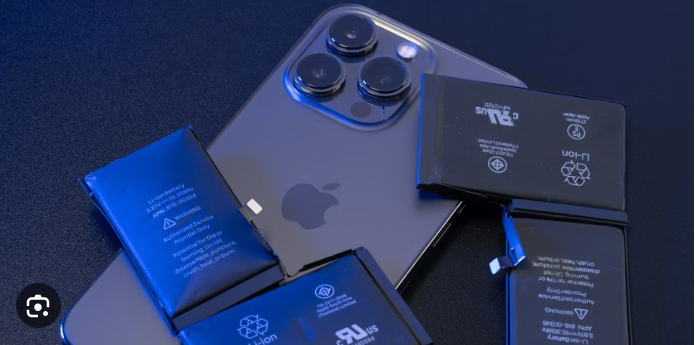
The iPhone battery is one of the most critical components of Apple’s ecosystem. No matter how powerful the processor, how advanced the camera, or how smooth the display is, the overall user experience depends heavily on battery performance. Over the years, Apple has made significant improvements in battery technology, optimisation, and power management, yet battery concerns remain one of the most discussed topics among iPhone users worldwide.
This comprehensive guide explores everything you need to know about the iPhone battery—from how it works and how long it lasts to charging habits, battery health, common problems, and best practices to extend its lifespan.
Understanding the iPhone Battery Technology
Lithium-Ion Batteries Explained
All modern iPhones use lithium-ion (Li-ion) batteries. These batteries are preferred because they:
-
Charge faster than older battery types
-
Deliver higher energy density
-
They are lighter and thinner
-
Have no “memory effect”
Lithium-ion batteries work by moving lithium ions between the positive and negative electrodes. Each charge cycle slightly reduces the battery’s ability to hold power, which is completely normal.
iPhone Battery Capacity and Models
Each iPhone model comes with a different battery capacity, measured in milliampere-hours (mAh). Newer models focus not only on larger batteries but also on software optimisation to improve efficiency.
Apple rarely markets battery size directly. Instead, it emphasises real-world usage, such as:
-
Video playback hours
-
Audio playback hours
-
Streaming time
This approach highlights Apple’s focus on optimisation rather than just raw battery size.
How Long Does an iPhone Battery Last?
Daily Battery Life
A brand-new iPhone battery can easily last a full day with moderate use, including:
-
Social media browsing
-
Messaging
-
Video streaming
-
Light gaming
Heavy usage—such as gaming, video recording, or navigation—can drain the battery faster.
Battery Lifespan
Apple designs iPhone batteries to retain up to 80% of their original capacity after 500 complete charge cycles under normal conditions. For most users, this translates to about 2–3 years of reliable performance.
iPhone Battery Health: What It Means
Battery Health Percentage
Apple introduced Battery Health to help users understand battery condition. You can check it by going to:
Settings → Battery → Battery Health & Charging
This section shows:
-
Maximum Capacity
-
Peak Performance Capability
A battery health of:
-
90–100% → Excellent
-
80–89% → Good
-
Below 80% → Replacement recommended
Optimised Battery Charging
What Is Optimized Charging?
Optimised Battery Charging is an Apple feature that reduces battery ageing by learning your daily charging routine. Instead of charging straight to 100%, the iPhone pauses at 80% and completes charging just before you usually unplug it.
Benefits
-
Slows chemical ageing
-
Extends battery lifespan
-
Reduces heat exposure
This feature is enabled by default on modern iPhones.
Charging the iPhone Battery Safely
Wired Charging
Apple supports fast charging using:
-
USB-C to Lightning (older models)
-
USB-C to USB-C (newer models)
Using certified chargers ensures:
-
Stable power delivery
-
Less heat
-
Longer battery life
Wireless Charging
Wireless charging is convenient, but:
-
Generates more heat
-
Charges more slowly than wired charging
Heat is one of the biggest enemies of battery health, so wireless charging should be used moderately.
Fast Charging and Its Impact
Fast charging can bring an iPhone to 50% in around 30 minutes, which is extremely useful. However:
-
It produces more heat
-
Frequent fast charging may slightly accelerate battery wear
Apple balances speed and safety through intelligent power management.
Common iPhone Battery Problems
Fast Battery Drain
Causes include:
-
Background apps
-
High screen brightness
-
Poor cellular signal
-
Software bugs
Battery Draining Overnight
Often caused by:
-
Background refresh
-
Location services
-
System updates
Phone Shuts Down Unexpectedly
This may happen when:
-
Battery health is very low
-
The phone experiences extreme temperatures
How to Improve iPhone Battery Life
Adjust Display Settings
-
Reduce screen brightness
-
Enable Auto-Brightness
-
Use Dark Mode (especially on OLED displays)
Manage Background Apps
-
Turn off unnecessary Background App Refresh
-
Close power-hungry apps
Control Location Services
-
Set apps to “While Using” instead of “Always”
-
Disable location access for non-essential apps
Update iOS Regularly
Apple often includes battery optimisations in iOS updates.
iPhone Battery and Temperature
Ideal Temperature Range
Apple recommends using iPhones between 0 °C and 35°C (32° to 95°F).
Effects of Heat
High temperatures can:
-
Permanently reduce battery capacity
-
Cause slower performance
-
Increase charging time
Avoid leaving your iPhone in direct sunlight or hot cars.
Low Power Mode: How Effective Is It?
Low Power Mode reduces:
-
Background activity
-
Visual effects
-
Automatic downloads
It can significantly extend battery life when you’re running low, making it one of the most useful battery-saving features.
Battery Usage Insights in iOS
The Battery section in Settings provides:
-
App-wise battery usage
-
Screen-on and screen-off time
-
Charging patterns
This data helps identify apps that drain excessive power.
When Should You Replace the iPhone Battery?
You should consider battery replacement when:
-
Battery health drops below 80%
-
The phone dies quickly
-
Performance throttling occurs
Apple offers official battery replacement, which restores performance and extends device life.
Original vs Third-Party Batteries
Apple Original Battery
Pros:
-
Guaranteed compatibility
-
Accurate battery health reporting
-
Safer performance
Third-Party Battery
Cons:
-
May not show battery health
-
Potential safety risks
-
Lower lifespan
Using non-certified batteries can affect device reliability.
Environmental Impact of iPhone Batteries
Apple focuses heavily on sustainability by:
-
Using recycled materials
-
Reducing harmful chemicals
-
Offering battery recycling programs
Proper battery disposal helps reduce environmental damage.
iPhone Battery Myths (Debunked)
Myth 1: Charging Overnight Damages the Battery
False. Apple’s smart charging stops overcharging.
Myth 2: Closing Apps Always Saves Battery
Not always. iOS manages background apps efficiently.
Myth 3: You Must Drain Battery to 0%
False. Partial charging is actually better for lithium-ion batteries.
Future of iPhone Battery Technology
Apple continues to invest in:
-
Better battery chemistry
-
Improved energy efficiency
-
AI-based power management
While solid-state batteries are still in development, software optimisation remains Apple’s biggest strength.
Final Thoughts
The iPhone battery is more than just a power source—it’s a carefully engineered system combining hardware, software, and intelligent management. By understanding how it works and following best practices, users can significantly extend battery life and maintain peak performance for years.
From optimised charging to smart power management, Apple has created one of the most reliable battery experiences in the smartphone industry. With proper care, your iPhone battery can remain strong, efficient, and dependable throughout the life of your device.
